askROI Blog
Biodata format for a job: what employers expect, with a sample
The biodata format Philippine employers expect, section by section, what you can leave out, and a filled sample you can copy for your own job biodata.
By askROI ·

Try it
The button opens a chat with the request below filled in. Send it, answer three short questions about yourself, and askROI makes a one-page biodata as a Word file you can edit and a PDF you can print or send.
Opens a new chat with a message you can edit before sending
You walk into a mall job fair or a BPO walk-in, and the HR desk asks for your biodata. Not a resume, a biodata. The biodata format is simpler than a resume: one page of facts about you, in an order employers already know, so they can read it in a minute and call you back.
Searching for a marriage biodata? That's a different document with a different reader. This one is for work.
Check which document they mean before you write
Three documents get mixed up, and each one answers a different question.
- A biodata is a one-page personal data sheet: who you are, how to reach you, where you studied and worked, and who can vouch for you. It's what many small employers, shops and BPO walk-ins ask for.
- A resume sells you for one job. It leads with what you achieved and skips most personal details. If the posting asks for a resume, the AI resume builder writes one around the role.
- A Personal Data Sheet (PDS) is the government's form. If you are applying to a government agency, they mean CS Form No. 212, the Personal Data Sheet from the Civil Service Commission (checked 29 October 2026, now Revised 2026). It is not a biodata you design yourself. The CSC's filling guide says to fill it in on a computer using the CSC's Excel file, put N/A in fields that don't apply, and attach a Work Experience Sheet when you apply for a vacant position.
If the request just says "biodata" and the employer is private, use the format below.
Five sections, in the order employers expect
- Personal information. Full name, address, mobile number and email at the top. Date of birth, place of birth, sex, civil status and citizenship are usual. A recent 2x2 photo goes in the top right corner if the employer asks for one.
- Educational background. Most recent first: school name in full, course or strand, and the years you attended. Add honors if you have them.
- Work experience. Most recent first: position, company, and the months and years you worked there. One line on what you did helps. First job? List internships, on-the-job training and part-time work.
- Skills. Short and specific: typing speed, languages you speak, software you use, a driver's license with its restriction code.
- Character references. Two or three people who are not relatives, with their position, company and mobile number. Ask them first.
End with a line saying the information is true and correct, then your signature and the date.
Leave out what the job does not need
Plenty of biodata templates still ask for height, weight, religion and your SSS or TIN number. You don't have to fill in every blank a template gives you.
The Data Privacy Act of 2012 (Republic Act 10173, checked 29 October 2026) says personal information must be "adequate and not excessive in relation to the purposes for which they are collected" (Section 11). It treats marital status, age, religion, health, and numbers issued by government agencies, such as your SSS number, as sensitive personal information (Section 3), which may be processed only in the cases Section 13 lists, such as when you have given consent for that specific purpose. It also gives you the right to be told what your information will be used for (Section 16).
In practice: keep what lets an employer identify and contact you and judge your fit. Leave off religion, height and weight unless the posting asks for them, and give your SSS, TIN, PhilHealth and Pag-IBIG numbers to HR when you're hired, not on a page you hand out at a job fair.
A sample biodata, made from the Try it prompt
We sent the Try it prompt for a fictional applicant, Angelica Reyes Santos, who wants a customer service job. This is the PDF askROI handed back.
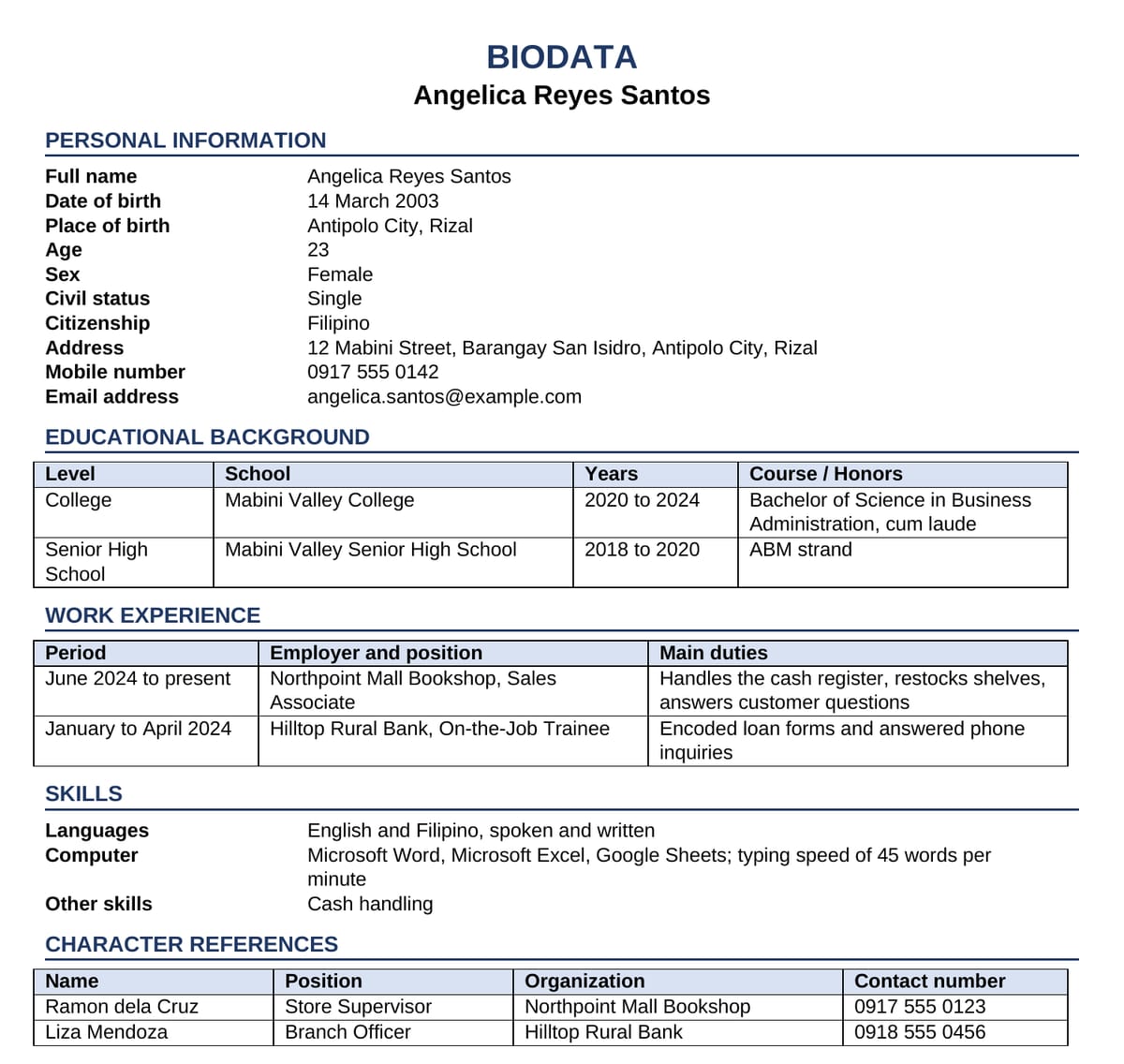
All five sections are there, in order, on one letter-size page. Schools and jobs are listed most recent first, and every name, date and number came from her answers. Religion and government ID numbers are missing because she asked to leave them out. There's no photo, and no certification line or space to sign, so ask for those if the employer wants them.
What you get back from askROI
After you send the prompt, askROI asks for your details in a short form with three questions: personal information, education and work experience, and skills and references. The first one lists religion and government IDs as things you may include. Say no, or say which ones the posting asks for.
Then it builds the page and hands back two files with your name on them, a .docx and a .pdf, and tells you what it left out. For Angelica it pointed out that she hadn't listed elementary or junior high school, or the cities she worked in, and left those off rather than guessing. One follow-up message added a job duty, and askROI updated both files; both still fit on one page. For other Word documents, start from the AI document generator.
Edit the Word file when the next posting needs a different skill near the top. Send the PDF when an employer asks for your biodata by email or Messenger, so the layout stays put.
A biodata is often the only page an employer reads before deciding whether to call you, so make every line on it one they asked for.