askROI Blog
How to edit a work email so it gets read and answered
Move the ask to the top, cut the draft in half, keep every fact: the three edits that get a work email answered, and what askROI does with a pasted draft.
By askROI ·
Try it
Paste a draft, say who it is going to, and askROI hands it back with the ask up front and a subject line. The button opens a chat with an example filled in, so you can replace it with your own email before you send.
Most work emails are not ignored because the reader is rude. They are ignored because the reader opened them, could not tell in five seconds what was being asked, and moved on to the next one. The fix is editing, not rewriting: three changes that take a minute by hand, or one paste into the AI Email Editor.
This post shows the three edits, then what askROI does with a real draft.
Why a clear email gets answered and a polite one does not
Picture the reader on a phone between meetings. The preview shows the subject line and the first sentence. If those two lines do not say what the email is about and what the reader has to do, the email waits for "later", and later rarely comes.
Three habits cause most of the waiting:
- The ask is buried. The request sits in the last paragraph, after the context, the apology, and the hope that the week is going well.
- The email is twice as long as it needs to be. Every extra sentence is one more reason to postpone a reply.
- The tone hedges. "Just checking in", "no rush", and "whenever you get a chance" tell the reader that nothing happens if they do not answer.
Edit 1: put the ask in the first two lines
Read your draft and find the sentence that says what you want. Move it to the top, right after the greeting, and give it its own line. If the email carries two requests, list them, so each one can be answered on its own.
The context does not disappear. It moves below the ask, where a reader who already knows the background can skip it.
Edit 2: cut it to half, keep every fact
Most drafts read better at half their length. Cut the warm-up ("hope your week is going well"), the restated history the reader already knows, and the softeners that undo the request. Keep every fact exactly as written: names, dates, amounts, invoice numbers, links, and attachment references. A shorter email that changes a date is worse than a long one that gets it right.
Edit 3: write the subject line last
Now that the email has one obvious ask, the subject line writes itself: the topic, plus the ask or the deadline when there is one. "Invoice 2041, payment now past due" tells the reader what to do before they open it. "Quick question" and "Following up" do not.
What askROI does with a pasted draft
Here is a draft that chases an overdue invoice. It is polite, and it would probably be ignored:
Hi Dana, just checking in on invoice 2041 for 3,200 dollars which was due on August 30. I know things get busy. Could you let me know when we can expect it? Thanks so much.
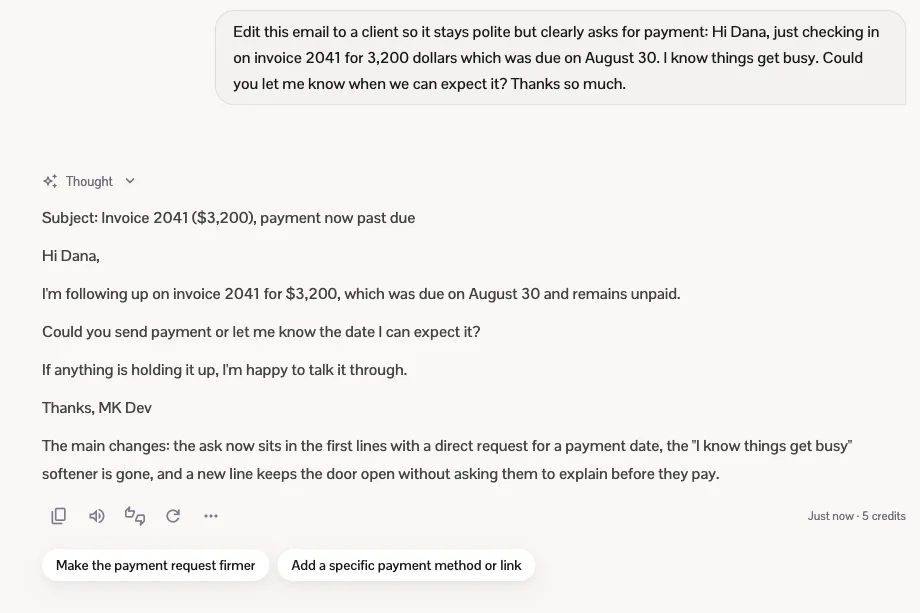
Pasted into the AI Email Editor with the note that it is going to a client, askROI returned this:
askROI returns the edited email: a subject line that names the invoice and the overdue payment, the ask in the first two lines, and a one-sentence summary of what changed
The edit does the three things above and nothing else. The subject line names the invoice and that it is past due. The first sentence states the fact (due August 30, still unpaid) and the second line asks for payment or a date. The "I know things get busy" softener is gone, and one line keeps the door open without asking the client to explain before they pay. The amount, the invoice number, and the due date are untouched, and the reply ends with a line naming the biggest changes, so you can see what moved before you paste it into your email client.
What askROI will not do is change what you are asking for, add a deadline you did not set, or make a promise you did not make. The ask, the facts, and the relationship stay yours; the edit changes where they sit and how much surrounds them.
The thirty-second check before you send
Before any work email goes out, read only the subject line and the first two lines and ask three questions:
- Can the reader tell what this is about?
- Can the reader tell what to do, and by when?
- Could the email be half as long with nothing lost?
If the answer to any of them is no, make the edit. Or let askROI make it: paste the draft into the AI Email Editor, say who it is going to, and keep chatting if you want it warmer, firmer, or shorter.