askROI Blog
How to make a comic strip with AI
Write the panels first, describe one character once, put the dialogue in quotes, and see the three-panel strip askROI drew from exactly that request.
By askROI ·
Try it
Describe the panels, the character and the exact lines, and askROI draws the strip as one image with the dialogue lettered in speech bubbles. The button opens a chat with a three-panel example filled in, so you can swap in your own joke.
A comic strip is a joke told in three or four pictures. The hard parts were always drawing the same character twice and lettering the bubbles without ruining the panel. An image model handles both if you ask in the right order, and the AI Comic Generator is set up to ask that way. This post shows how to write the request, then a strip made from it.
Step 1: write the panels before the prompt
Decide the panel count first. One panel is a gag with a caption. Three panels is setup, turn, punchline, and it is the right default for a joke. Four gives the punchline a beat of silence before it. More than four, and the strip should be split into two images.
Then write one line per panel that says what is visible and what is said. Keep each spoken line under about eight words. Long lines come back as cramped bubbles or missing words, and a short line is funnier anyway.
Step 2: describe the character once, in detail
Consistency is the thing people notice first in an AI comic, and it comes from the description, not the model. Give the recurring character three or four fixed features (short curly hair, round glasses, yellow hoodie) and say that she looks the same in every panel. Name the style in the same sentence: newspaper strip, classic American comic, manga, minimal webcomic.
Do not describe the character again inside each panel. One description, then the panels refer to "she" or "the duck". Repeating the features with slightly different wording is what makes panel three drift.
Step 3: put the dialogue in quotes
Write the lines exactly as they should appear, in quotation marks, panel by panel. The quotes tell the model which text is lettering and which text is direction. "She says 'Semicolon.'" renders a bubble reading Semicolon. "She says something short and annoyed" renders a bubble that says whatever the model guesses.
What askROI drew from the example
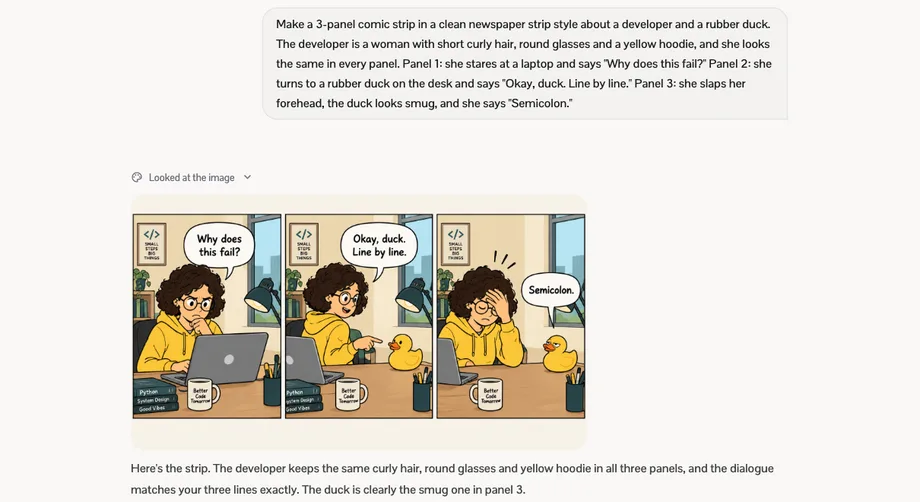
Here is the request from the button above, sent to the AI Comic Generator: a three-panel newspaper-style strip, a developer with short curly hair, round glasses and a yellow hoodie, a rubber duck, and three quoted lines.
The three-panel strip askROI drew: the developer frowning at a laptop asking "Why does this fail?", turning to the rubber duck with "Okay, duck. Line by line.", then hand on forehead saying "Semicolon." while the duck looks smug
The character holds across all three panels: same hair, same glasses, same hoodie, same desk, same mug. The three lines are lettered word for word. The duck gets its smug look in panel three because the request asked for it, and the room details (the poster, the lamp, the stack of books) stay put, which is what makes it read as one strip rather than three pictures.
askROI returns the strip as one image, so it can be posted or dropped into a slide as is. Ask for a second strip in the same thread and it keeps the developer and the duck, which is how a one-off gag becomes a series.
When the result is not right
Three fixes cover most misses:
- A bubble has the wrong words. Repeat the exact line in quotes and say which panel. Shorten it if it was long.
- The character changed between panels. Restate the three fixed features once and ask for the same strip again. Cutting extra description usually helps more than adding it.
- The joke lands flat. Change the last line only. Keeping panels one and two the same is cheaper, and the punchline is nearly always the problem.
Start with a joke you have already told out loud. Write it as three quoted lines, describe one character, and send it to the AI Comic Generator. The strip comes back as a single image with the bubbles lettered, ready to post.