askROI Blog
ChatGPT Plus alternatives that make images and video
ChatGPT Plus lists image creation but no video. These plans include both, from $4.99 a month, each checked on its own pricing page.
By askROI · · Updated

Try it
This button opens a new chat with Video already switched on and the request in the box. Next to it you'll see the clip's settings and the most it can cost, all before you send anything.
Opens a new chat with a message you can edit before sending
ChatGPT Plus costs $20 a month. Its plan card promises better image creation, more deep research and more Codex, and says nothing about making video. If you want pictures and short clips from one subscription, four plans list both, and two of them cost half as much or less.
We read every price below on the vendor's own pricing page on October 29, 2026. They are US monthly prices before tax, and they change by country and over time.
Four plans list video, two for half the price of Plus
Every plan here makes images, so the table compares video.
| Plan | US price a month | Video |
|---|---|---|
| Google AI Plus | $4.99 | Yes |
| askROI Pro | $9.99 | Yes |
| Google AI Pro | $19.99 | Yes |
| Microsoft 365 Premium | $19.99 | Not listed |
| ChatGPT Plus | $20 | Not listed |
| Grok Premium | $30 | Yes |
Every plan has usage limits, so "Yes" means the plan lists video, not that video is unlimited. Two $8 plans come close and stop short: ChatGPT Go and Grok Plus both make images, and neither includes video.
askROI Pro shows you what a clip costs before it renders
askROI Pro is $9.99 a month for 20,000 credits. The AI image generator, the AI video generator and the AI music generator all spend from that one balance, and the same plan hands back documents as real files: a deck as PowerPoint, a report as Word, a budget as Excel.
Video has its own mode. Switch on Video, describe the shot, and attach a photo if you want it to guide the clip. Above the box you set the shape, the length and the resolution, and the most the clip can cost updates as you change them: on a paid plan, 8 seconds at 720p reads up to 656 credits. The free plan makes Video mode clips at 360p with sound, and Pro, Ultra and Max, including the Pro trial, share 720p, 1080p, 4K and upscaling. If that's more than you meant to spend, pick a shorter clip or a lower resolution. Send it and the clip shows up in the chat when it's done.
Each message after that makes another take. Ask for a change and askROI edits or extends the last take, and Make final upscales a take. Rendering a draft in full quality, at 720p or 1080p with sound, needs a paid plan. Each take shows what it cost.
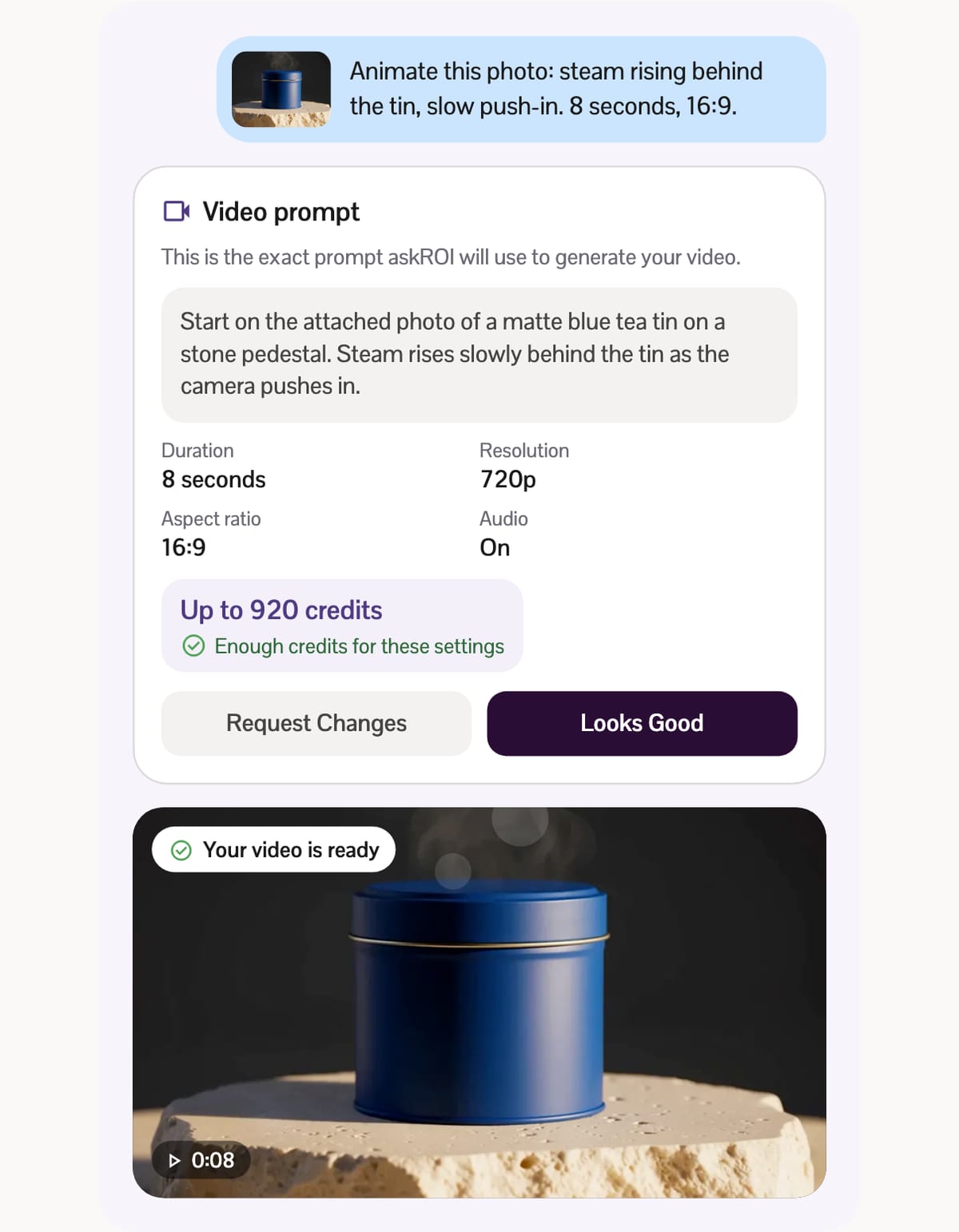
The charge lands when the video is ready, and a video that fails costs nothing. Clips run 3 to 15 seconds and come with sound. The tea tin at the end of that animation is a frame from a real clip made in askROI.
What 20,000 credits buys in video
Credit counts are only useful with real numbers next to them. On November 6, Video mode quoted a 5 second 720p clip at up to 410 credits, so Pro's 20,000 monthly credits cover at least 48 of them if you spend them on nothing else. Pick a plan and a clip length to see the rest.
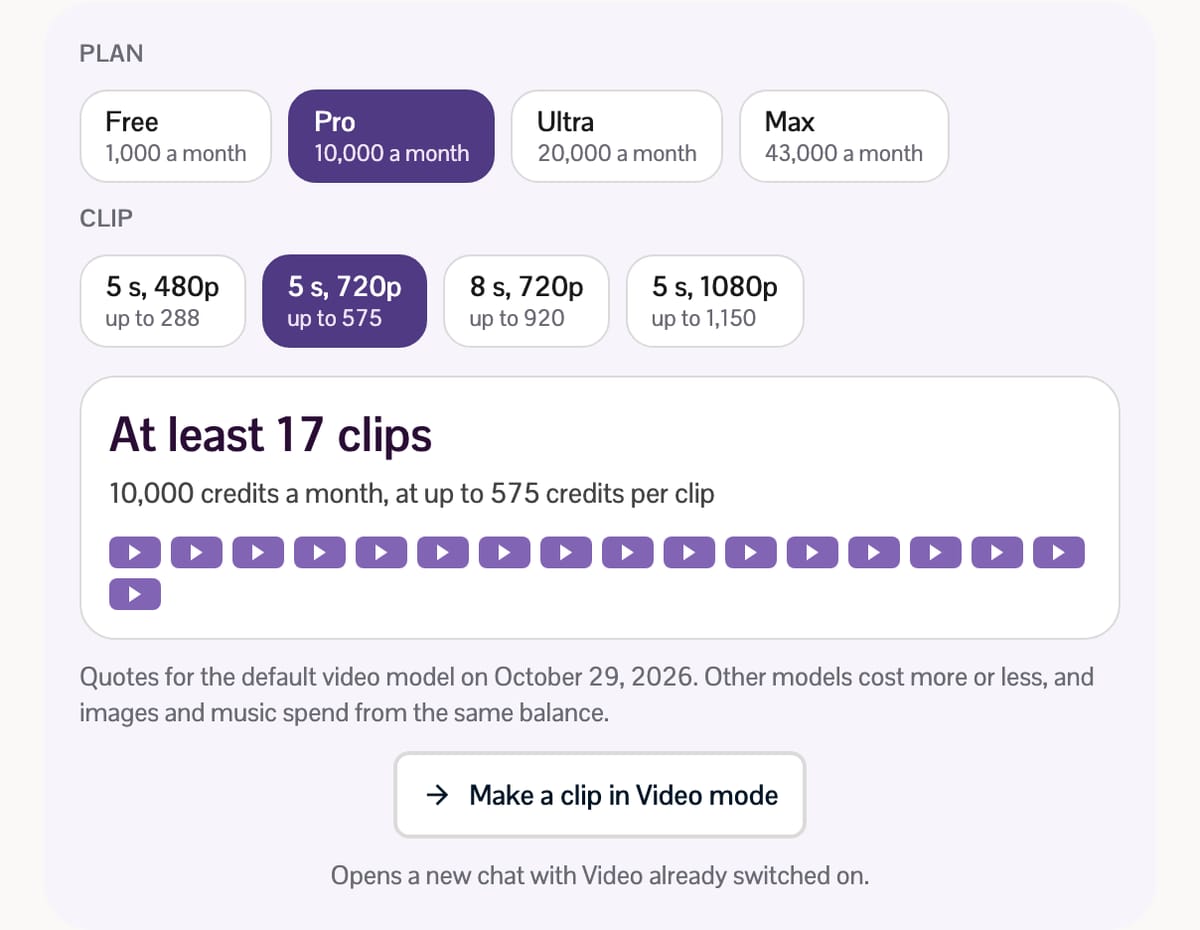
Images cost far fewer credits than video, and Ultra ($19.99 for 40,000 credits) and Max ($39.99 for 86,000) add credits and nothing else. Every paid plan gets the same features, and the ones the free plan lacks are motion design, 3D models, video in 720p, 1080p and 4K, video editing from a prompt, Premium voices, voice cloning, audio cleanup and dubbing, and live data that refreshes every 5 minutes. Paid plans also remove the ads in the mobile apps and the askROI watermark on exports and published sites. The free plan comes with 1,000 credits a month and no card.
Pick askROI if you want images, video, music and editable Office files in one app on the web, iPhone and Android, and you like knowing what a clip costs before you send it.
Google AI Plus and Pro: the cheapest video, inside Google's apps
Google AI Plus is the cheapest plan here that lists video. For $4.99 a month you get more access to image, music and video generation in Gemini and Search, 200 credits a month in Google Flow (Google's tool for building video scenes), and 400 GB of storage. Google AI Pro, at $19.99, steps up to "expanded" access across Gemini, Search and Flow, 1,000 Flow credits, 5 TB of storage, Gemini in Docs and Sheets, and YouTube Premium Lite.
Google describes most limits in words (more, expanded, higher) rather than numbers, so outside Flow it's hard to know how many clips you get before you run out.
Pick Google if Gmail and Drive are home base, or if the storage alone is worth the price to you.
Grok Premium: video starts at the $30 tier
Grok's comparison table gives the $8 Plus plan image generation but no video. Video starts at Premium, $30 a month, which also has four times the usage of Plus and X perks such as ad-free scrolling on most surfaces. Usage comes from one shared pool that refills every week, so a heavy Saturday doesn't drain your month.
Pick Grok if you already pay for X features and want video in the same subscription.
Microsoft 365 Premium and ChatGPT Plus: images, no video listed
Microsoft 365 Premium is $19.99 a month, or $199.99 a year. It's the Office suite with Copilot inside Word, Excel, PowerPoint and Outlook, plus AI image creation in Copilot Chat. Microsoft's plan comparison doesn't list video.
ChatGPT Plus lists image creation next to deep research, Codex, projects and scheduled tasks. Video isn't on its pricing page.
Both are good at what they're for. If you live in Office, or ChatGPT already runs half your day, they'll make you good pictures. They just don't answer the video half of the question.
How to choose
Start with what you'll make most. If it's short clips for social posts, product shots or storyboards, the price gap is wide: $4.99 for Google AI Plus, $9.99 for askROI Pro, $30 for Grok Premium. If the clip is one piece of a bigger job, with a deck to show it in and a spreadsheet to track the launch, askROI keeps all of it on one balance and puts the cost of each clip on screen before you say yes.
Plans like these change every few months, so open the linked page before you subscribe. askROI's free plan has enough credits for one short clip, which is the quickest way to judge the quality yourself.