askROI Blog
How to reconcile a bank statement with your books, step by step
A bank reconciliation in plain steps: start from both balances, match every line, and sort what is left into timing differences, missing entries and errors.
By askROI ·

Try it
Paste your bank statement and your cash book, and askROI lists every difference, says why it happened and builds the reconciliation as an Excel file. The button fills in a made-up March for a small cafe, so you can see it work before you use your own numbers.
Opens a new chat with a message you can edit before sending
A bank reconciliation is how you check that your own record of the money agrees with the bank's. You compare the two for one period and explain every difference, until both sides arrive at the same adjusted balance.
The two starting balances almost never match, and that's normal. The point isn't to make them match. It's to account for the gap, line by line, so what's left over is something you can name. This guide uses account reconciliation on a small example you can run yourself.
The steps
- Write down both closing balances for the same date: the statement's and your cash book's.
- Tick off every line that appears on both, with the same amount. A date that differs by a few days is fine.
- List the bank lines missing from your book. Fees, interest and direct debits you forgot to enter usually live here.
- List the book lines missing from the bank. Cheques that haven't cleared and deposits that haven't landed live here.
- Check the amounts on the ticked lines. Two entries can match on name and date and still disagree on the figure.
- Adjust each side. Timing items change the bank side, and missing entries or errors change the book side.
- Compare the two adjusted balances. If they agree, you're done. If not, there's a line you haven't found yet.
The rule in step 6 trips up most people. A cheque you've written is real money gone, and the bank just hasn't caught up, so you adjust the bank's figure and leave your book alone. A bank fee you never entered is your mistake, so you fix your book.
A worked example: one month at a cafe
Corner Cafe, a made-up business, ends March with $7,920.50 on the bank statement and $8,142.00 in the cash book. That's a gap of $221.50, and it hides five separate items.
We sent the data in the Try it button to askROI, and it came back with an Excel workbook with five tabs: the reconciliation, the differences, both source lists and notes.
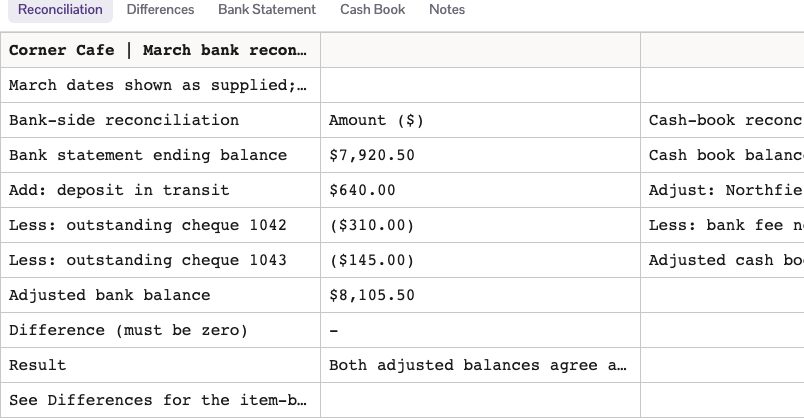
Here's the arithmetic, which we checked by hand against the rows:
| Bank side | Amount | |
|---|---|---|
| Statement balance | $7,920.50 | |
| Deposit in transit | +$640.00 | In the book, not yet at the bank |
| Cheque 1042 | -$310.00 | Written, not yet cleared |
| Check 1043 | -$145.00 | Written, not yet cleared |
| Adjusted balance | $8,105.50 |
| Book side | Amount | |
|---|---|---|
| Cash book balance | $8,142.00 | |
| Northfield Beans | -$18.00 | Typed as $368, the bank took $386 |
| Bank fee | -$18.50 | On the statement, never entered |
| Adjusted balance | $8,105.50 |
(Some countries say cheque and some say check. It's the same thing.)
Both sides land on $8,105.50. The workbook's Differences tab gives each item its own line, including one that needs no adjustment at all: cheque 1041 was entered on the 6th and cleared on the 8th, which is timing that sorted itself out inside the month.
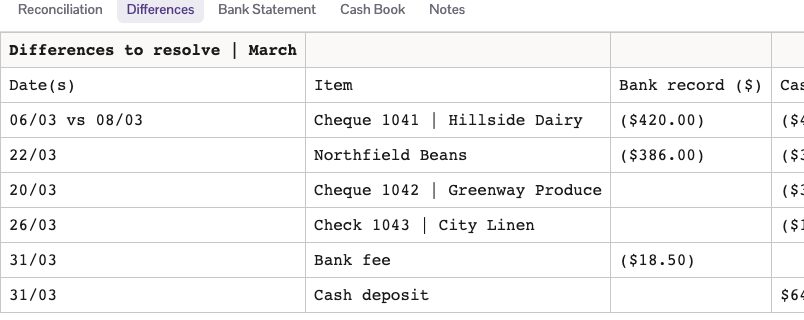
The file is an ordinary Excel workbook, the same kind the Excel generator makes, so you can open it and check each figure yourself.
Why it doesn't balance: the usual causes
When you've worked through the list and there's still a gap, look at these in order:
- A transposed figure. $368 for $386 is the classic. If the leftover gap divides evenly by 9, as $18 does, suspect two swapped digits.
- A sign the wrong way round. A payment entered as a receipt leaves a gap of twice its amount.
- A wrong opening balance. If last month's reconciliation was off, this month inherits it.
- Something counted twice. Look for one payment that appears twice in your book, or a transfer entered on both sides.
- The wrong dates. Make sure the statement and the book cover exactly the same period.
How often to reconcile
Monthly suits most small businesses, ideally soon after the statement closes while you still remember what each line was. A busy shop or anyone handling a lot of cash may prefer weekly, because a shorter list is easier to sort. Once it's clean, it feeds your month-end reports, such as the income statement from the financial statement generator.
Keep the result with the statement. Next month's opening figures start from it, and a clean starting point is what keeps the next one short.