askROI Blog
How to build a monthly budget from your bank export
Export one month of transactions, group them, set a planned amount beside each actual, and see the spreadsheet askROI builds from a pasted bank export in one message.
By askROI ·
Try it
Paste a month of transactions from your banking app, say what you take home, and askROI returns a budget spreadsheet with categories, planned and actual columns, and formulas that show what is left. The button opens a chat with a sample export filled in, so you can replace it with your own.
Most budgets fail at step one: typing last month's spending into a spreadsheet. The numbers already exist in your banking app, as a list of dates, merchant names and amounts. This post shows how to turn that list into a working monthly budget, by hand or in one message to the AI Budget Planner.
Step 1: export one full month
Open your banking app, pick last month, and export or copy the transactions. A CSV download is ideal, but a plain copy of the list works too: date, description, amount. Include the salary line so income is in the same place as spending, and include any transfer to savings, since that is a budget line like any other.
One month is enough to start. Three months is better once the first budget exists, because it shows which categories swing.
Step 2: group the lines into categories
Every merchant name needs a category. Keep the list short, around ten, and name them the way you think about money, not the way a bank does:
- Fixed bills: rent or mortgage, utilities, phone, insurance.
- Everyday spending: groceries, transport, eating out and takeaway.
- Discretionary: shopping, subscriptions, entertainment, health and fitness.
- Savings and debt: transfers to savings, loan or card payments.
The grouping is the slow part by hand. Five Tesco lines become one groceries number, the pub goes under eating out, and Amazon needs a decision every time.
Step 3: set a planned amount next to each actual
A list of actuals is a spending report. It becomes a budget when each category has a planned figure beside it and a variance column that shows the difference. Fixed bills are easy to plan: they are what they are. For everything else, start with last month's actual rounded to a sensible number, then move the ones you want to change.
The formulas matter more than the first set of numbers. Totals, the left-over figure and the variances should be calculated, so that changing one planned amount updates everything below it.
What askROI does with a bank export
Here is the sample from the button above: a September export of 25 lines with take-home pay of 3,650, pasted into the AI Budget Planner with a request for categories, planned versus actual columns and what is left to save.
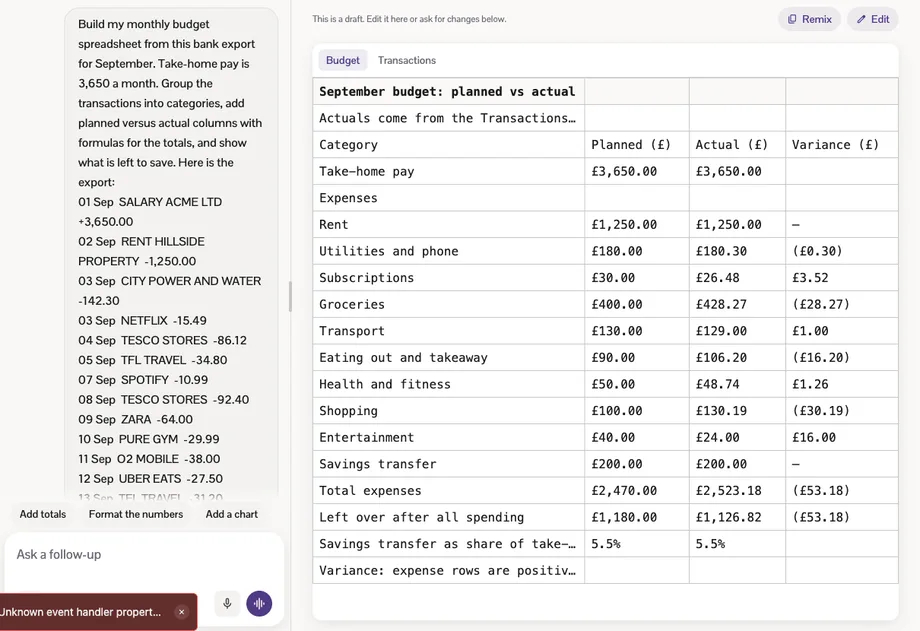
The September budget spreadsheet askROI built from the export, with ten categories, planned and actual columns, a variance column, total expenses of 2,523.18 and 1,126.82 left over after all spending
The result is an Excel workbook with two sheets. The Budget sheet has ten categories with planned, actual and variance columns, a total, the left-over figure, and the savings transfer as a share of take-home pay (5.5%). The Transactions sheet holds all 25 lines with a category against each one, and the actuals on the Budget sheet are formulas over that list, so moving a transaction to another category moves the money with it.
askROI's summary of the workbook: 1,127 left after all spending, 53 under the planned figure, the categories over and under plan, a note that the planned amounts are estimates highlighted in yellow, and the grouping decisions it made
askROI made the grouping decisions and said which ones it made: Amazon and Zara under shopping, the phone bill under utilities, the pub under eating out. It also said what it estimated. There were no planned amounts in the export, so it set starting targets, highlighted them in the sheet, and asked for real ones before the variances are trusted. With those estimates, September came in 53.18 over plan, almost all of it groceries and shopping.
The spreadsheet opens in the chat, so you can read it before downloading. Ask for a change in the same conversation (split groceries from household, add a category for the car, show the savings rate as a target) and it rebuilds the file.
Making it a monthly habit
The first budget takes one export. From the second month on, the routine is shorter: paste the new export, keep the categories and the planned amounts, and look only at the variance column. A category that is over plan three months in a row is a planned amount that needs to change, not a spending problem.
Start with last month's export and the AI Budget Planner. Paste the list, say what you take home, and the spreadsheet with categories and working formulas comes back in the chat.