askROI Blog
PDF to PPT: turn your notes into a PowerPoint in minutes
Go from PDF to PPT with an AI PPT maker by sending your notes, audience, slide count and time limit, then get a PowerPoint with speaker notes to edit.
By askROI ·

Try it
Tap the button, attach your PDF with the + button in the message box (Add files or photos), and send. The request asks for 10 slides for a 10 minute talk; change the numbers to fit yours.
Opens a new chat with a message you can edit before sending
You have a PDF of lecture notes, a presentation on Thursday, and no slides. A PDF to PPT job sounds like a file conversion, but copying thirty pages of notes onto thirty slides gives you a deck nobody can read from the back row. What you want from an AI PPT maker is shorter: ten slides you can talk over, with what to say written underneath each one.
That takes four details in your request and about three follow-up messages.
Send the file, the audience, the slide count and the time
- The file. A PDF up to 20 MB and 500 pages, attached in the same chat where you ask for the deck. You can also paste your notes straight into the message. Attaching a file needs a free askROI account.
- Who it's for. "Classmates in a second year accounting course" and "my branch manager and four team leads" call for different words on every slide. Say which one you're facing.
- How many slides. Give a number. Ten slides for ten minutes is a comfortable pace for a class talk, and it stops the model from turning every paragraph of your notes into its own slide.
- How long you have. The time limit sets how long each slide's notes run.
Say PowerPoint or .pptx in the request so askROI builds a .pptx file. Without it, askROI may build the deck in its own slide viewer, which has a Download as PowerPoint button. The AI PPT maker page starts the same kind of request with the fields laid out for you.
If the PDF is long, a whole textbook chapter or a 60 page report, cut it down first. Ask the PDF summarizer for a two page brief of the parts your talk covers, then ask for the deck in that same chat.
What comes back is a .pptx with your notes under each slide
We sent the button's request with a three page PDF of made-up water cycle lecture notes attached. In under two minutes the chat showed a card for The_Water_Cycle.pptx: ten 16:9 slides, a navy title slide, white content slides with one teal accent, and a summary slide that walks through the four stages and lists the key terms. Each slide title states its point ("Condensation forms clouds as air cools"), with three or four short bullets taken from the notes. The reply listed all ten slides and pointed out that the title slide had no presenter name yet.
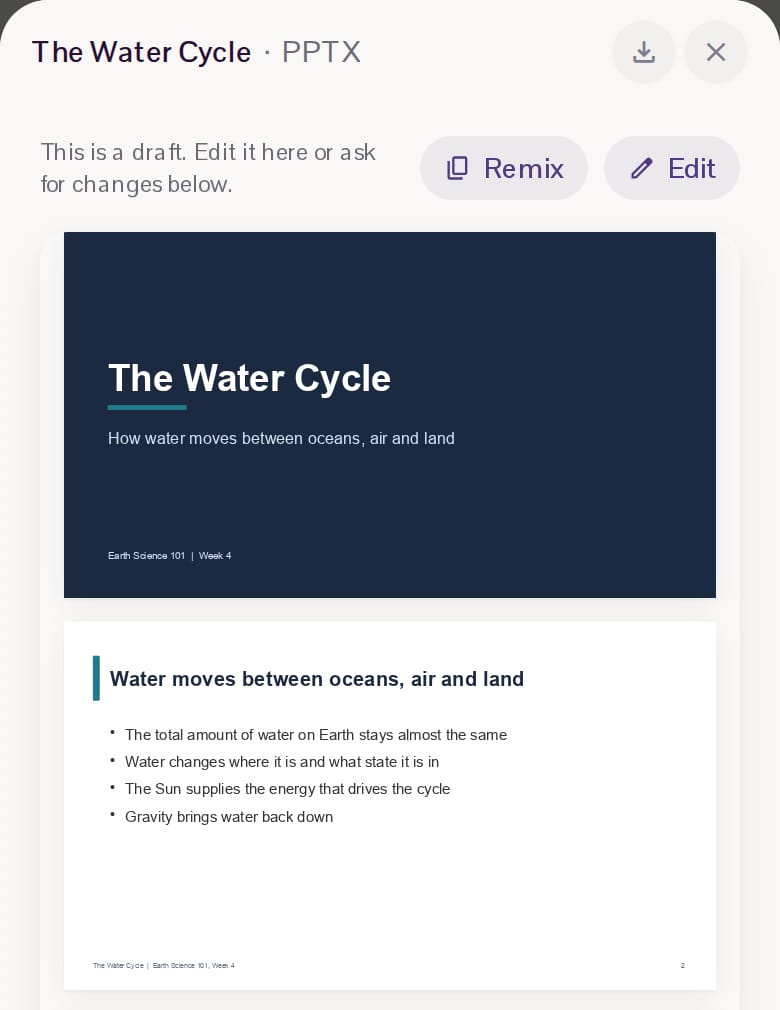
Tap Open on the card to page through the slides, and the download button at the top saves the .pptx to your laptop or phone.
The speaker notes are in the file itself. All ten slides had their own notes page, 59 to 85 words each, written to be said out loud. The first one opens: "Welcome. Over the next ten minutes we will follow a single drop of water around the planet." In PowerPoint the notes sit in the Notes pane under the slide while you edit. When you present, Presenter view shows them on your screen and not on the projector (Microsoft support, checked 29 October 2026). Keep "speaker notes under each slide" in your request so every slide gets them.
NotebookLM, Gamma or askROI
All three make slides from material you already have. They stop in different places.
- NotebookLM (Google's help pages now call it Gemini Notebook) turns the sources in a notebook into a slide deck you can download as a PDF or a .pptx. Its help page doesn't mention speaker notes, and slide decks are only for users over 18 (Google help, checked 29 October 2026).
- Gamma exports to PowerPoint with speaker notes and your theme's fonts embedded. On the Free plan the exported file carries a "Made by Gamma" badge, and the export has no slide master (Gamma help, checked 29 October 2026).
- askROI builds the .pptx in the chat where you attached the PDF, and you change it by asking there. Fine layout work happens in PowerPoint or any app that opens .pptx.
Make it yours in three edits
Send these three messages in the same chat as the deck.
- Fix the slide you'd stumble on. Read through once and find the busiest slide. "Slide 4 has too many words. Cut it to three short bullets and move the rest into the speaker notes."
- Put your own example in. Lecture notes are generic; your talk shouldn't be. "On slide 6, replace the example with the sari-sari store case from week 3: weekly sales dropped 15 percent after a new supermarket opened nearby."
- Fit the notes to the clock. Read the notes aloud with a timer. If you run long, "Shorten every slide's speaker notes so the whole talk fits in 9 minutes" leaves you a minute for questions.
Download the new file after the last edit. Then open it in PowerPoint and look at every slide once: you know the material, and a wrong date or a misread figure from your notes is yours to catch.
Spend the saved time saying it out loud
In the room, the notes are what you lean on. Get the deck done in the first ten minutes, then spend the evening reading the notes aloud twice.