askROI Blog
Can ChatGPT make a PowerPoint? How to get an editable deck
Can ChatGPT make a PowerPoint? Yes, on some plans. Here's what ChatGPT, Gamma and Copilot give you, and how to ask for a deck that needs little fixing.
By askROI ·

Try it
Say who the talk is for, how long you have and what it needs to cover, and ask for the file. The AI presentation maker sends back a PowerPoint with speaker notes that you can open and change.
Opens a new chat with a message you can edit before sending
Can ChatGPT make a PowerPoint? Yes, though what you get depends on your plan. OpenAI's Slides feature is rolling out to some paid plans, so if you need a file you can edit this week, ask for a .pptx by name and check what comes back.
The harder question is whether the deck is any good. Most of that comes down to what you put in the request.
What the main tools give you
We read each company's own help pages on 5 November 2026. These change often, so check before you pay for anything.
| Tool | What you get | Editable in PowerPoint |
|---|---|---|
| ChatGPT Slides | A deck you edit directly or by asking, shared with teammates. Rolling out on Pro, Business and Enterprise with Space access | OpenAI says you can present or export it |
| Gamma | A deck in Gamma, exported from the Share menu | Yes, as PPTX with speaker notes. Free plan exports carry a "Made by Gamma" badge |
| Copilot in PowerPoint | A new presentation from a prompt, inside PowerPoint | Yes, it's already there. It depends on your Microsoft 365 subscription or your organization's settings |
All three are reasonable. If your company already pays for Copilot, try that first, since the deck starts inside the app you'll finish it in.
How to ask for a deck that needs little fixing
A vague request gets a vague deck. Four details do most of the work:
- The audience. "Small business owners" changes the words, the examples and what you can skip.
- The time limit. Fifteen minutes and ten slides tells the AI how much can fit on each one.
- One point per slide. Without this, slides fill up with paragraphs that you'll end up reading aloud.
- The file you want. Say ".pptx" and "speaker notes", or you may get an outline in the chat.
If you have material already, attach it, and say which parts matter. A request built on your own figures needs far less fixing than one the AI had to guess at.
What askROI made from that prompt
We sent the Try it prompt and got a 10-slide file called getting_paid_on_time.pptx. askROI's reply said it has speaker notes on every slide and pacing for a 15-minute talk, and that the late-fee slide tells people to agree terms in advance and check their contract and local law. Nobody asked for that last caution, and it's the right one to add.
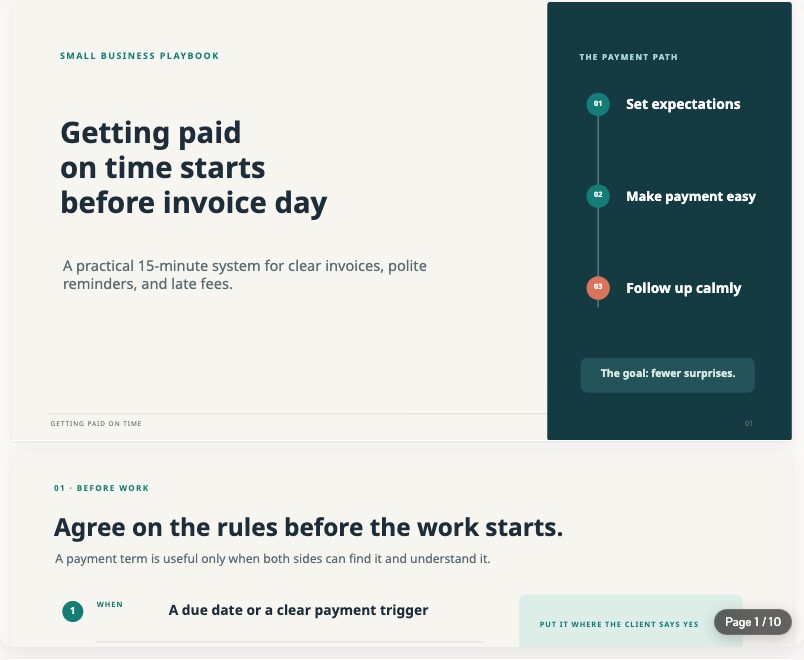
The titles carry the argument, so you can read them alone and follow the talk. That's the part we'd keep. As with any draft, read every slide before you stand up, and swap in your own examples, because a story from your own business beats a generic one.
A .pptx file opens in PowerPoint, and in Google Slides too if that's where your team works. If you'd rather start there, the Google Slides generator saves the deck to your connected Google Drive.
Changing a slide by asking
You don't have to open the file to make a change. The preview in the chat offers quick edits such as Fewer words per slide and Add a closing slide, and you can type your own request: "Make slide 4 about one reminder email, and add the wording." To work by hand, use Edit, or download the file.
Ask for one change at a time. It's easier to see what moved, and easier to go back if you don't like it.
A deck is a draft of what you're going to say, so the quickest test is to read the speaker notes out loud against a clock. If it runs long, tell askROI which slide to cut.