All AI tools
AI Comparison Table Generator
Name the options and what matters to you. Get back a comparison spreadsheet that weights the criteria, scores each option, and names the winner with a formula.
Sign in before choosing files. Only your text draft is saved. Choose your files here after signing in.
Help
with
Tap a field to fill it in
Nothing sends until you start, and you can change anything afterwards.
Export formats
- Excel spreadsheet (.xlsx)Opens in Excel, Numbers, and Google Sheets.
Every export also lands in your Library as an artifact you can revise, share with a link, and pick up again in another chat.
How it works
- Give askROI the options, the criteria that matter, and which criteria matter most.
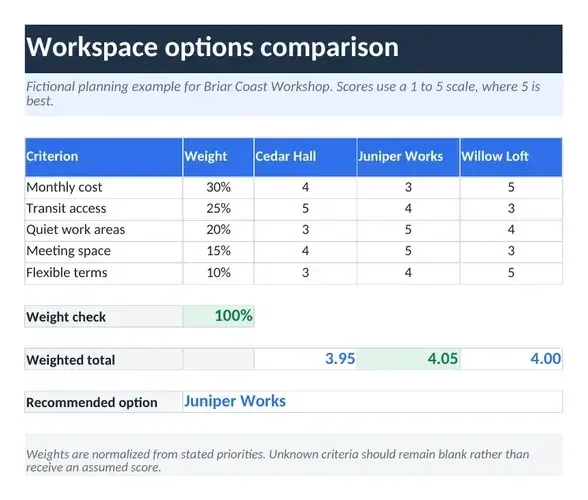
- It builds a spreadsheet with one row per criterion, a weight column that checks to 100 percent, a score column per option, a SUMPRODUCT total for each option, and a formula cell that names the winner.
- Download the Excel file and change a weight or a score; the totals and the winner update on their own.
What people use it for
- Purchasesscore laptops, cars, or appliances on the things you care about rather than the whole spec sheet.
- Job offersput pay, flexibility, and growth on one scale and see which offer wins on your priorities.
- Vendors and toolscompare suppliers on cost, support, and fit, with the weighting visible to everyone who reviews it.
- Housingweigh rent against commute and space before you sign.
Questions
- Is the AI comparison table generator free?
- Yes. You can build comparison spreadsheets on the free plan. Paid plans raise the usage limits and include more credits for Premium mode.
- What is in the spreadsheet?
- One row per criterion. The first column holds the weight, then there is one column per option holding its score. Each option's total is a SUMPRODUCT of the weights and its scores, a check cell shows the weights add up to 100 percent, a note states the scoring scale, and a labelled cell names the option with the highest total, with that total highlighted.
- Where do the scores and weights come from?
- Weights come from the priorities you state, normalised so they total 100 percent. Scores come only from what you tell askROI about each option. Where you gave nothing to score, the cell is left blank for you to fill in rather than guessed.
- Can I change the weighting later?
- Yes. Edit any weight or score in the file and the totals and the winner recalculate, or ask askROI to add a criterion or drop an option and it rebuilds the workbook.
- How is this different from the AI Decision Maker?
- The decision maker answers in the chat with a recommendation and its reasons. This tool builds the workbook, so you can see the arithmetic, move a weight, and watch the answer change.