All AI tools
AI Expense Report Generator
Paste your expenses or drop the receipts. Get back an expense report spreadsheet with subtotals by category, ready to submit.
Sign in before choosing files. Only your text draft is saved. Choose your files here after signing in.
Turn
Tap a field to fill it in
Nothing sends until you start, and you can change anything afterwards.
Export formats
- Excel spreadsheet (.xlsx)Opens in Excel, Numbers, and Google Sheets.
Every export also lands in your Library as an artifact you can revise, share with a link, and pick up again in another chat.
How it works
- Paste your expenses or attach photos and PDFs of the receipts.
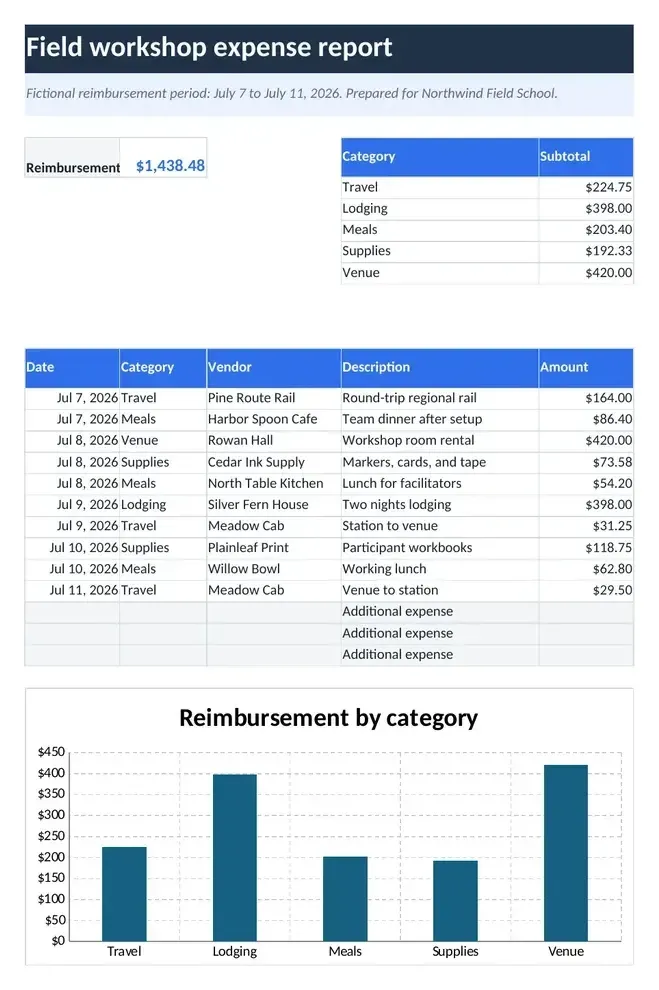
- askROI lists each expense with date, vendor, category, and amount, adds formula subtotals and a grand total, and builds the Excel file.
- Download it, or ask for your company's categories, a different currency, or a mileage rate.
What people use it for
- Business travelturn a trip's receipts into the report finance wants.
- Monthly claimskeep recurring work expenses in one submitted file.
- Freelancerstotal deductible expenses by category for your accountant.
- Team eventstotal a shared event's receipts by category for one claim.
Questions
- Can it read my receipts?
- Yes. Attach photos or PDFs and askROI reads the date, vendor, and amount from each. Check the figures before you submit, as faded receipts can be misread.
- Does it calculate the totals or just type them?
- It uses formulas, so the subtotals and the grand total update if you correct a line or add a missing expense in the file.
- Can I use my company's categories?
- Yes. Tell askROI the categories your expense policy uses and it maps each line to one of them.
- Will it add expenses I did not give it?
- No. Every row comes from what you pasted or attached. Where a receipt is unclear it picks the closest category and flags the row in the description so you can check it.

 askROI