All AI tools
AI Content Calendar Generator
Name the channel, the audience, and the cadence. Get back a filled content calendar as a spreadsheet with post ideas already in it.
Sign in before choosing files. Only your text draft is saved. Choose your files here after signing in.
Plan
weeks
posts
,
a
Tap a field to fill it in
Nothing sends until you start, and you can change anything afterwards.
Export formats
- Excel spreadsheet (.xlsx)Opens in Excel, Numbers, and Google Sheets.
Every export also lands in your Library as an artifact you can revise, share with a link, and pick up again in another chat.
How it works
- Name the channel, who it is for, how often you post, and what you want to be known for.
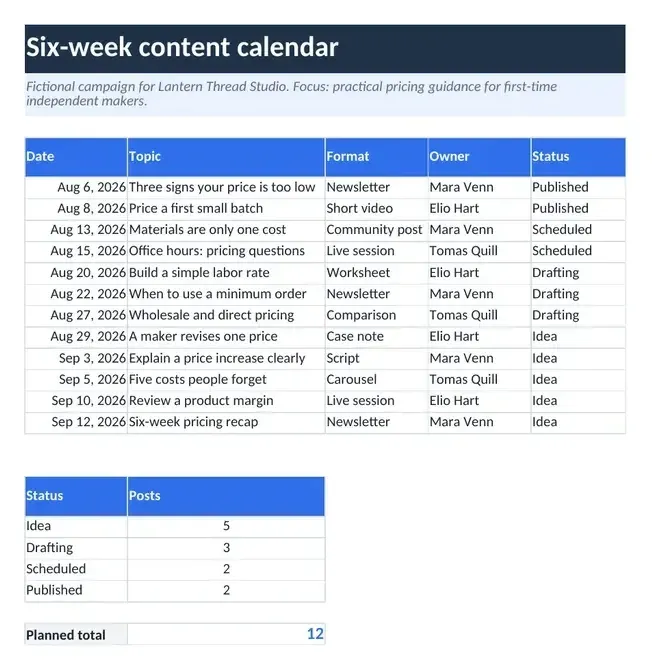
- askROI fills a calendar with dated topics, formats, an owner, and a status list, with formulas that count posts per status, and adds a backlog sheet for spare ideas.
- Download the Excel file and edit, reorder, or swap ideas as the weeks go by.
What people use it for
- Small business socialstop deciding what to post every morning.
- Blog and newsletterplan a season of topics that build on each other.
- Launches and eventsschedule the build up and the follow through in one view.
- Agenciesdraft a calendar for a client to react to.
Questions
- Does it write the posts or just the plan?
- The plan: one row per post with the date, topic, format, owner, and status, plus a backlog sheet for future ideas. Ask askROI to draft any post from the calendar and it writes it in the chat.
- Can I change the cadence or the channels later?
- Yes. Ask for a different number of posts a week, another channel, or a longer run and it rebuilds the file. You can also edit the sheet directly.
- Does it know my audience?
- It works from what you tell it. The more specific you are about who you are talking to and what you want to be known for, the better the ideas fit.
- Does it make up dates or events?
- The template instructs askROI to include only events, holidays, promotions, and launches you name, using the event dates you provide. Named events without dates belong in the backlog marked "Date to be confirmed". If you name none, it suggests evergreen topics. Publishing dates are suggestions. Tell it the week to start from and review the plan before scheduling posts.

 askROI