All AI tools
AI Meeting Minutes Generator
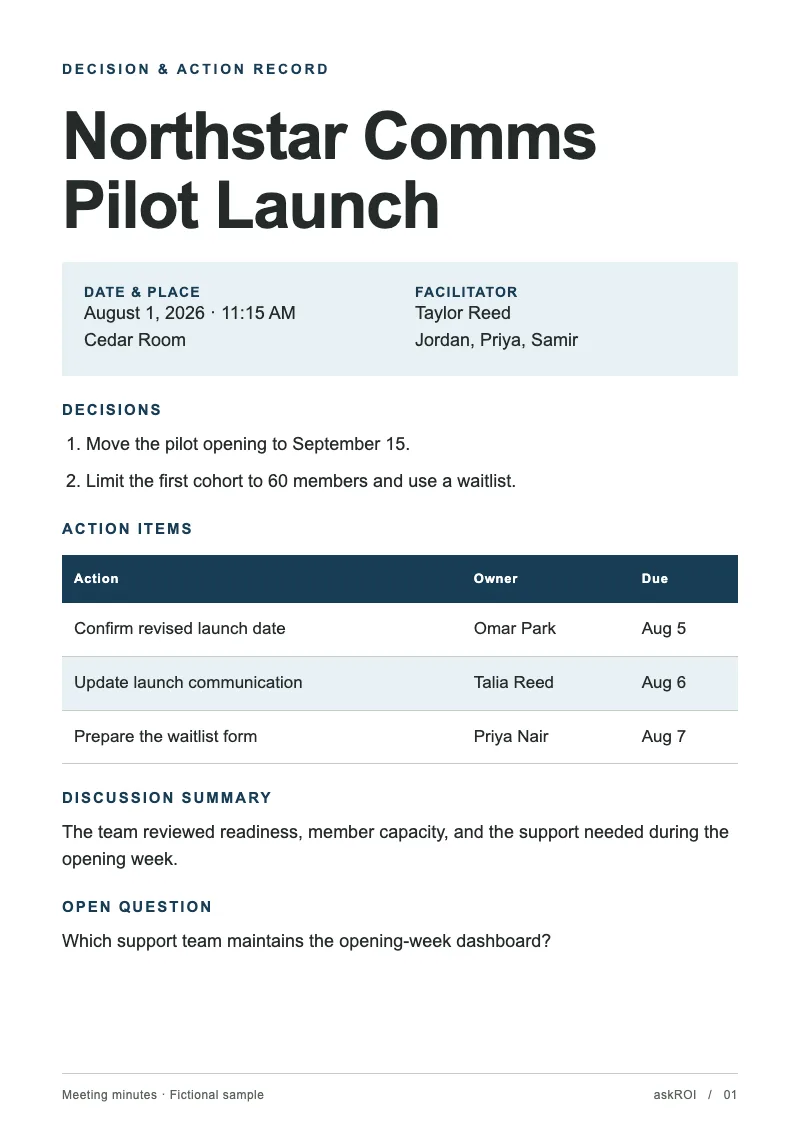
Paste your rough notes or a transcript. Get back formal minutes as a Word document with decisions and actions pulled out.
Sign in before choosing files. Only your text draft is saved. Choose your files here after signing in.
Turn
Tap a field to fill it in
Nothing sends until you start, and you can change anything afterwards.
Export formats
- Word document (.docx)Opens in Word, Pages, and Google Docs.
- PDF (.pdf)Opens anywhere and prints as laid out.
Every export also lands in your Library as an artifact you can revise, share with a link, and pick up again in another chat.
How it works
- Paste your notes or a transcript, as rough as they are.
- askROI structures them into minutes with attendees, discussion, decisions, and action items, and builds the Word file.
- Download it, or ask for a shorter summary version to send around.
What people use it for
- Team and project meetingscirculate minutes the same day without retyping your notes.
- Board and committee meetingsproduce the formal record with decisions clearly stated.
- Client callsconfirm what was agreed in writing before anyone forgets.
- Transcriptscondense a recording's transcript into what matters.
Questions
- What if my notes are a mess?
- That is the normal case. Fragments, shorthand, and out of order points are fine. askROI groups them by topic and pulls out the decisions and actions.
- Will it add things that were not discussed?
- No. It only records what is in your notes and flags where a decision seems to be missing an owner or a date, so you can fill it in.
- Can I get it as a PDF instead?
- Yes. Ask for a PDF and askROI converts it, which is handy for minutes that go on file.
- Can it handle a full transcript?
- Yes. Attach or paste the transcript and ask for minutes. Long transcripts take a little longer, and you can ask for a one paragraph summary as well.

 askROI