All AI tools
AI Project Tracker Generator
Describe the tasks and who is on the project. Get back a project tracker spreadsheet with a status dropdown on every task and a summary sheet that counts work by status.
Sign in before choosing files. Only your text draft is saved. Choose your files here after signing in.
Set
with
Tap a field to fill it in
Nothing sends until you start, and you can change anything afterwards.
Export formats
- Excel spreadsheet (.xlsx)Opens in Excel, Numbers, and Google Sheets.
Every export also lands in your Library as an artifact you can revise, share with a link, and pick up again in another chat.
How it works
- Describe the project, its tasks, the people involved, and the key dates.
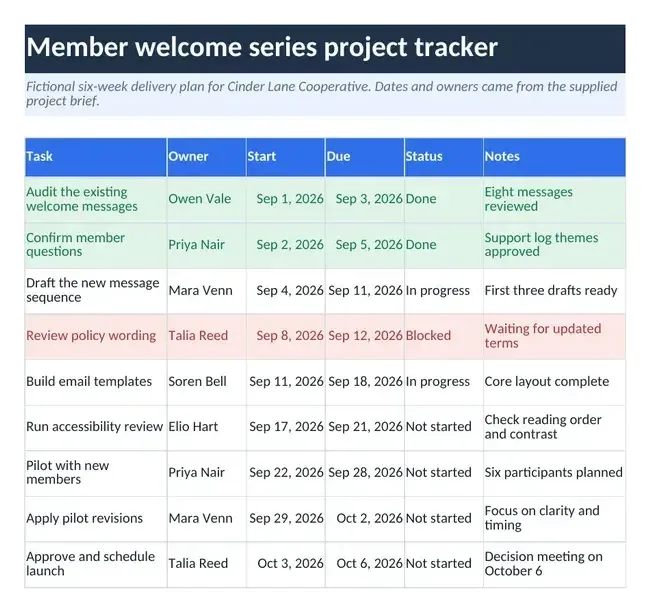
- askROI builds an Excel workbook with a Tasks sheet (Task, Owner, Start, Due, Status, Notes) and a Summary sheet that counts tasks by status with COUNTIF formulas.
- Download it, set each task's status from the dropdown and watch the summary update, or ask askROI to add tasks or move dates.
What people use it for
- Small team projectsone shared file with tasks, supplied owners and dates, and blank owner cells for unassigned work.
- Eventsthe venue, the suppliers, and the deadlines, with a count of what is still open.
- Launches and releasestrack the last stretch to a ship date and see how much is blocked.
- Personal projectsa house move or a renovation broken into tasks with dates you can hold to.
Questions
- Is the AI project tracker generator free?
- Yes. You can build project trackers on the free plan. Paid plans raise the usage limits and include more credits for Premium mode.
- What is in the workbook?
- Two sheets. Tasks has columns for Task, Owner, Start, Due, Status, and Notes, with real date cells, a frozen header row, and columns sized so names and notes are readable. Summary has one row per status (Not started, In progress, Blocked, Done) with a COUNTIF formula over the Tasks sheet, plus a total row.
- Does it assign owners and dates for me?
- It fills in the owners and dates you gave it. Where you did not name an owner, the cell is left blank rather than guessed, so nobody ends up on a task they never agreed to.
- Can I change the status list?
- The dropdown ships with Not started, In progress, Blocked, and Done. Ask askROI for different statuses and it rebuilds the workbook with the new list and matching summary rows, or edit the data validation in your spreadsheet app.
- Will it open in Google Sheets?
- Yes. It is a standard Excel file and opens in Google Sheets and LibreOffice with the formulas, the date cells, and the status dropdown intact.