All AI tools
AI Proposal Generator
Describe the work and the client. Get back a one page proposal as a PDF you can send the same day.
Sign in before choosing files. Only your text draft is saved. Choose your files here after signing in.
Write
,
,
Tap a field to fill it in
Nothing sends until you start, and you can change anything afterwards.
Export formats
- PDF (.pdf)Opens anywhere and prints as laid out.
Every export also lands in your Library as an artifact you can revise, share with a link, and pick up again in another chat.
How it works
- Describe the work, who it is for, the timeline, and the price.
- askROI writes the proposal, lays it out on one page, and builds the PDF.
- Download it, or ask for a different structure, tone, or price breakdown.
What people use it for
- Client worksend a clean proposal instead of a long email.
- Retainers and packagesset out what is included and what is not.
- Internal proposalsmake a recommendation to your own leadership on one page.
- Quotespair scope with price so there is no dispute later.
Questions
- What goes on the page?
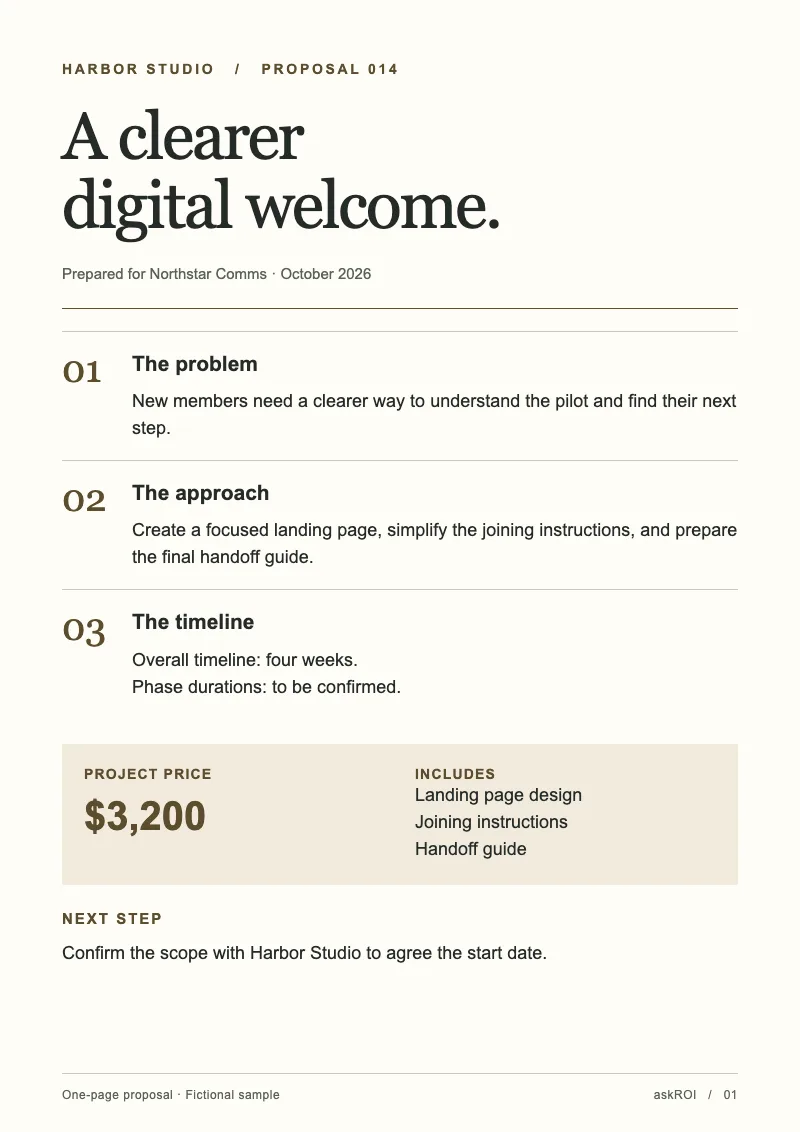
- The problem in the client's terms, the proposed approach, a timeline with phases, the price and what it includes, and one concrete next step, in that order.
- Will it invent a price or a timeline?
- The template instructs askROI to use only the price, dates, and durations you provide. Missing values are marked "Price to be confirmed", "Timeline to be confirmed", or "Duration to be confirmed" for each phase. A total duration is kept without inventing phase durations. Review these placeholders and the draft before sending it to a client.
- Why only one page?
- Because that is what gets read. The single page is a hard limit and askROI cuts detail rather than overflowing it. If the client needs more, ask for a longer companion document in the same chat.
- Can I edit it after it is generated?
- Keep chatting. Ask for a different structure, tone, or layout and askROI rebuilds the file. Every output is an editable draft, not a final answer.

 askROI