All AI tools
AI Study Guide Generator
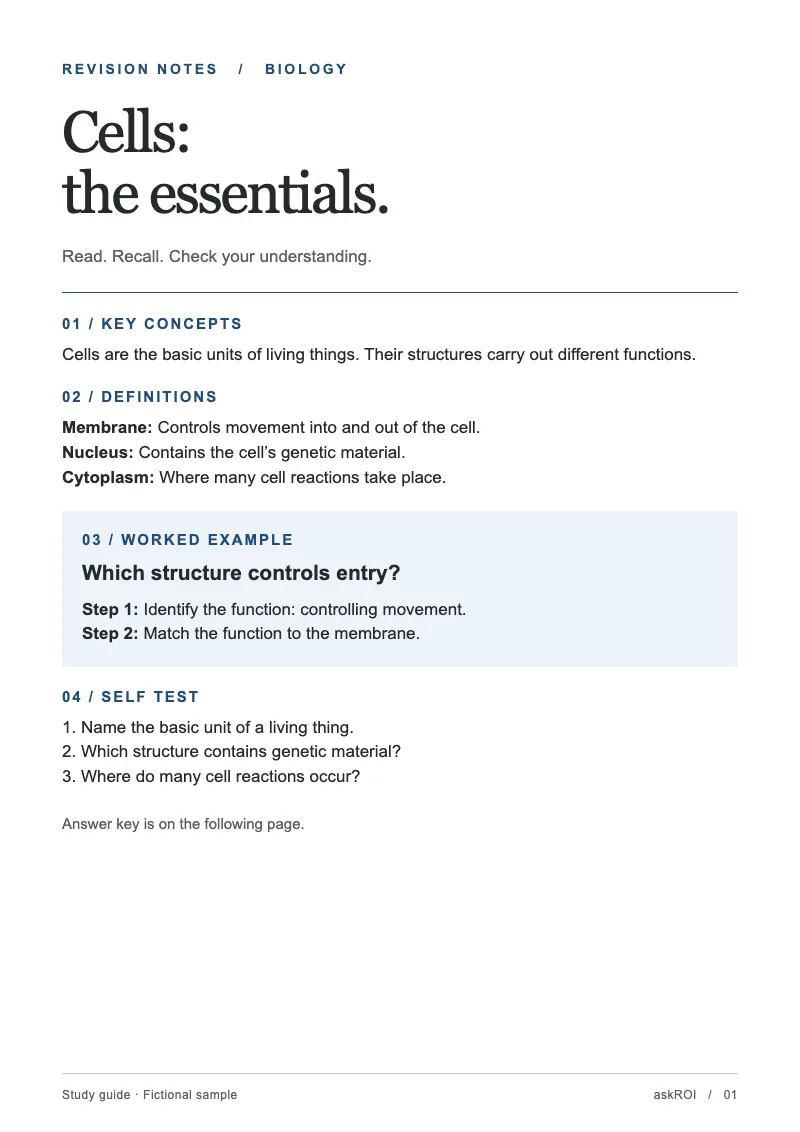
Paste your notes or the syllabus. Get back a printable study guide as a PDF with the key ideas, definitions, and practice questions.
Sign in before choosing files. Only your text draft is saved. Choose your files here after signing in.
Make
with
Tap a field to fill it in
Nothing sends until you start, and you can change anything afterwards.
Export formats
- PDF (.pdf)Opens anywhere and prints as laid out.
Every export also lands in your Library as an artifact you can revise, share with a link, and pick up again in another chat.
How it works
- Paste or attach your notes, slides, or the syllabus, and say what you are studying for.
- askROI condenses it into key concepts, definitions, worked examples, and a self test with the answer key on the last page, then lays it out as a PDF.
- Print it, or ask for more questions, a one page cheat sheet, or a focus on the parts you find hardest.
What people use it for
- Exam revisionturn a term of notes into something you can actually revise from.
- Catching upmake sense of lectures you missed from the slides.
- Professional certificationscondense a thick manual into the testable points.
- Teachinggive students a guide built from your own material.
Questions
- Does it just summarise, or does it test me too?
- Both. It ends with a self test that covers every key concept, and the answer key sits on the last page after a page break so you can withhold it while testing.
- Can I get flashcards instead?
- Ask for a flashcard format and askROI lays the guide out as question and answer pairs you can print and cut, or keep as a PDF.
- Will it add material that is not in my notes?
- No. It stays strictly within the material you give it and flags gaps rather than importing outside content, so what you revise is what your course actually covered.
- Can I edit it after it is generated?
- Keep chatting. Ask for a different structure, more detail on one topic, or a shorter version and askROI rebuilds the file.

 askROI