Inventory spreadsheet template
List what you stock. Get an Excel inventory that totals stock value and flags reorders.
Nothing sends until you start, and you can change anything afterwards.
Export formats
- Excel spreadsheet (.xlsx) Opens in Excel, Numbers, and Google Sheets.
Every export also lands in your Library as an artifact you can revise, share with a link, and pick up again in another chat.
How it works
- List each item with the quantity on hand, the unit cost and the level at which you reorder it.
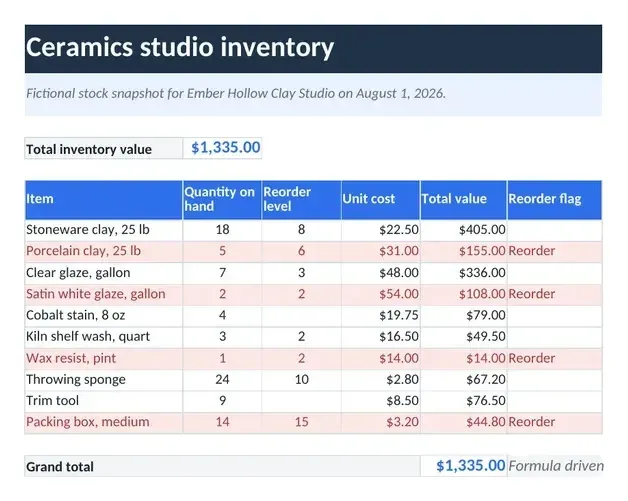
- askROI builds an Excel workbook: total value per item and for all stock, plus a reorder flag that highlights every item at or below its reorder level.
- Download the file and update quantities as stock moves, and the values and flags recalculate.
What people use it for
- Small shops know what your stock is worth and what to reorder before you run out.
- Cafes and restaurants track beans, milk, cups and packaging against the levels you reorder at.
- Online sellers check stock value and spot low items before a busy weekend.
- Office supplies keep paper, toner and stationery from running out.
- Spare parts a simple count of parts on the shelf for a repair or service business.
Questions
Is the inventory spreadsheet template free?
Yes. You can make inventory spreadsheets on the free plan. Paid plans raise the usage limits and include more credits for Premium mode.
What columns does it have?
Item, quantity on hand, reorder level, unit cost, total value and a reorder flag. Total value multiplies quantity by unit cost, a total row adds up the value of all stock, and the flag reads Reorder and highlights the row when the quantity is at or below the reorder level.
What if I have not set a reorder level?
The item shows "Set reorder level" instead of a made-up threshold, so it never looks safely stocked by accident. A reorder level of zero is kept as you gave it. If a quantity or unit cost is missing, that row's value stays empty and the total is marked incomplete.
Can I use it in Google Sheets?
Yes. You get an Excel file, and you can upload it to Google Sheets and keep editing it there.
What does it not do?
It does not connect to a till, a point of sale or an online store, so quantities change only when you edit them. It does not track suppliers, locations or stock movements over time.